
A new universe for your storage.Meet the space theme

Your space. Reimagined.

A little less clutter.
A lot more space.

Make room for what matters. Clear the clutter on your Mac and iPhone, with a little help from Spaceback. Now with a universe of its own.

Free to start. Also on iPad. Yours to keep tidy.

Spaceback’s friendly ghost holding glowing purple cleanup tools, floating among stars and planets.
A little space goes a long way
On-device scansYou approve every removalOne Pro across your devices

Two apps. One mission.

More room.
Wherever you need it.

Your MacBook’s crowded disk. Your iPhone’s overflowing library. Meet the right tools for each.

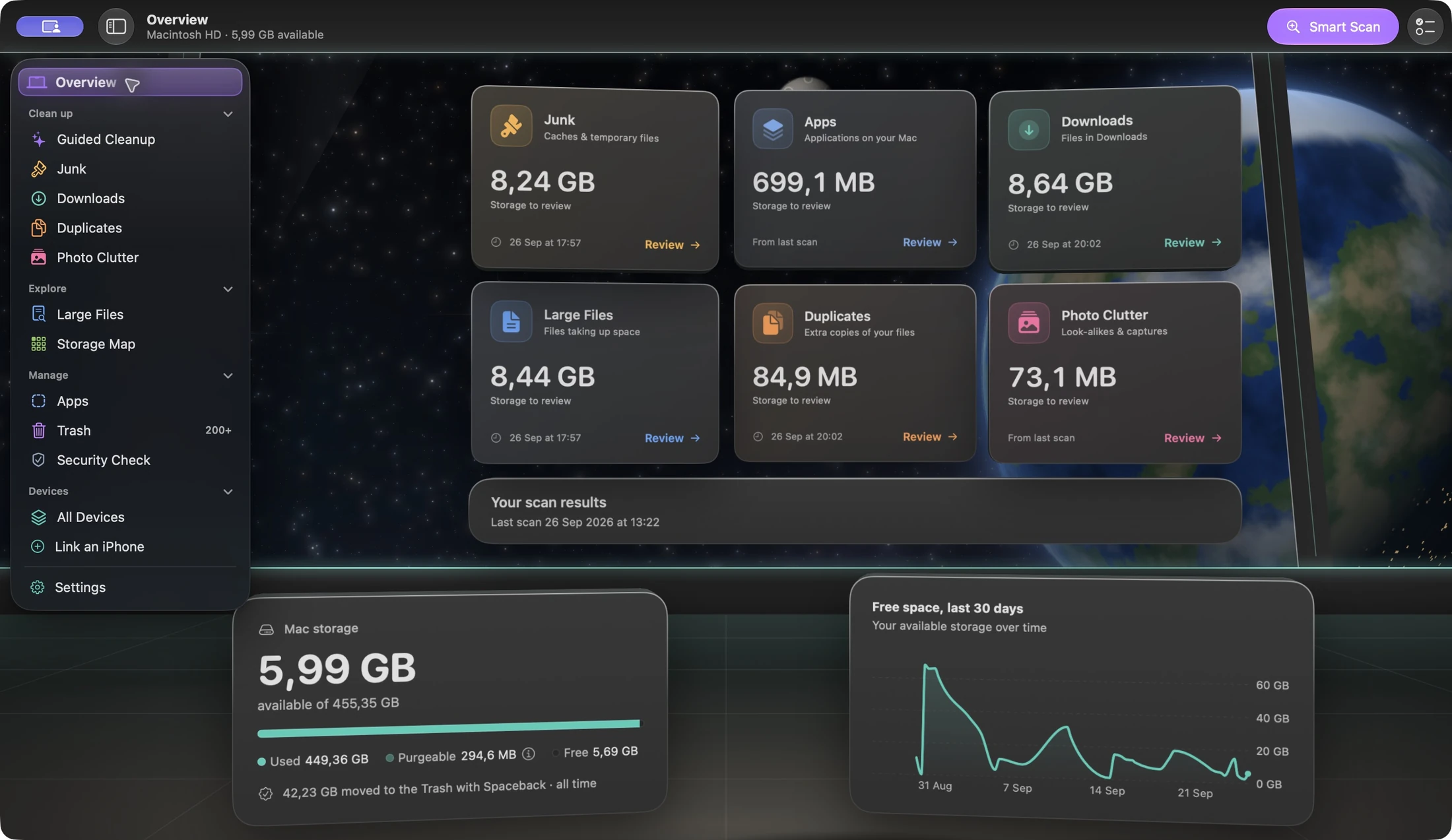
Spaceback on MacBookThe new Spaceback Mac overview: storage categories, a free-space chart and cleanup tools in a space-themed workspace.

For Mac

Your disk, with a clearer view.

Find old downloads, junk, duplicate files and photo clutter. Explore what’s taking up room, then choose what goes to the Trash.

  • Smart Scan
  • Storage Map
  • Guided Cleanup
  • Duplicate finder
Get Spaceback for Mac macOS 14+ · Apple silicon & Intel
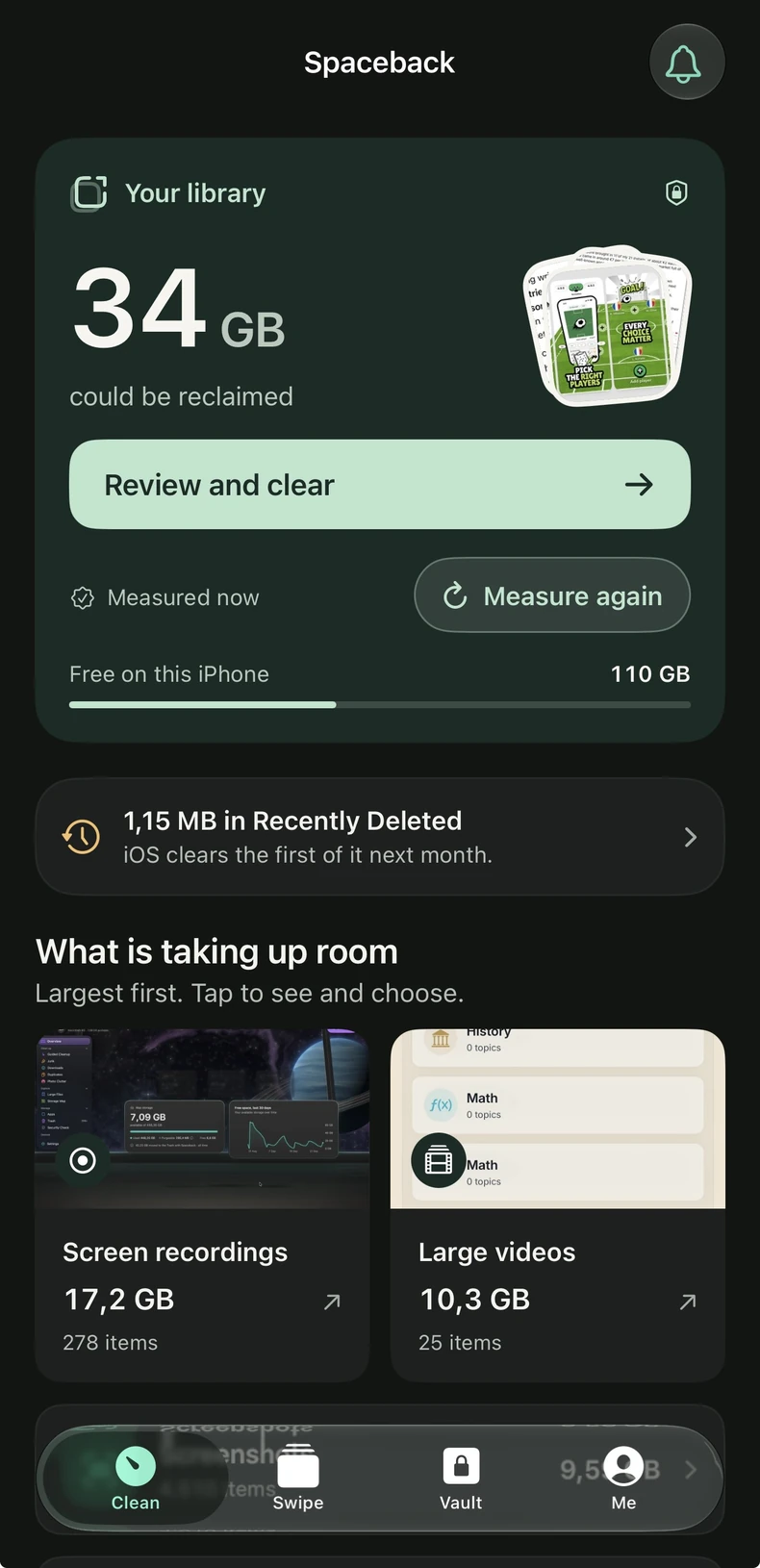
Spaceback on iPhoneSpaceback on iPhone, showing the photo library, Recently Deleted, large videos and screen recordings.

For iPhone & iPad

Keep the memories.
Lose the clutter.

Review photos, duplicates, large videos and screen recordings. Swipe through what you want to keep, and check your choices before removing anything.

  • Photo review
  • Large videos
  • Swipe cleanup
Get Spaceback for iPhone iOS 17+ · Also available on iPadOS 17+

Real app screens. Storage amounts shown are examples; your results depend on your files.

What’s new

Welcome to your
new space.

The space theme is here
01 / A NEW PERSPECTIVE

Your cleanup tools.
A cosmic new home.

Stars, planets and a redesigned Mac workspace. See your storage categories, available space and free-space history from your own little corner of the universe.

Spaceback’s new Mac space theme, with cleanup categories over a view of Earth.
02

Your devices, in one space.

The new device room gives your Mac and linked iPhone a place together. Link your iPhone from the Mac app, then keep using the cleanup tools built for each device.

New on Mac · Device linking

See the device room
03

A first run that starts with you.

On iPhone, see your available storage from the start, choose what you’d like to tackle, and watch Spaceback measure your library. Real progress, with a total you can check.

New on iPhone · Guided setup

Still your call.

Review what was found. Confirm what goes.

Still on your device.

Your files and photos are scanned locally.

Still one Spaceback Pro.

One App Store purchase across Mac, iPhone and iPad.

A little space. Or a lot.

Start free.
Make more room with Pro.

Useful from the first scan. One App Store Pro purchase works across your Mac, iPhone and iPad.

Spaceback FreeNo purchase needed

A good place to start.

See what’s taking up room, and start clearing the everyday clutter.

  • Mac: run every scanner and explore Storage Map
  • Mac: clean Downloads, large files and core junk
  • iPhone & iPad: measure and review your photo library
  • iPhone & iPad: remove up to 50 items per 24 hours
Download free
Spaceback ProMac + iPhone + iPad

One Pro. All your space.

Unlock the deeper cleanup tools on Mac and lift the daily removal limit on iPhone and iPad.

  • Remove duplicate files, photo clutter and app leftovers on Mac
  • Clean developer caches and old iOS backups on Mac
  • Schedule Mac scans, with a review before removal
  • Remove more photos and videos on iPhone and iPad
Explore Pro in the app

Monthly, annual and lifetime options. The app shows current pricing in your local currency before you buy. Subscriptions renew until cancelled; lifetime is a one-time purchase. Restore your App Store purchase using the same Apple Account on each device. Tools vary by platform.

Looking for the direct-download Mac edition?

Spaceback Pro for Mac isn’t sandboxed, so it also reads the shared caches in /Library. One licence covers every Mac you own: $79.99 once (USD; local prices and VAT at checkout).

Explore Spaceback Pro

A few down-to-earth answers

Good to know
before you go.

Your storage deserves clear answers.

Talk to the person who built it
What’s new in Spaceback?

The Mac app has a new space-themed workspace, a redesigned storage overview and a device room where you can link your iPhone. On iPhone, the new setup shows your available space, asks what you want to work on and measures your library with visible progress. Both apps keep you in control of what gets removed.

Do the Mac and iPhone apps do the same thing?

They share a purpose, with tools suited to each device. On Mac, Spaceback finds junk, downloads, duplicate files, large files and app leftovers. On iPhone and iPad, it works with your photo library: photos, duplicates, large videos and screen recordings. The iPhone app doesn’t clear other apps’ caches or iOS system storage.

Does one Pro purchase cover all my devices?

Yes. An App Store Spaceback Pro purchase works across Mac, iPhone and iPad with the same Apple Account. Use Restore Purchases if needed. Device linking is separate from purchase restoration. The direct-download Mac edition uses a separate licence; an AppSumo licence is not an App Store in-app purchase.

Does Spaceback remove things automatically?

No. You review the results and confirm what to remove. On Mac, Spaceback asks macOS to move selected files to the Trash and reports any failures. On iPhone and iPad, selected items move to Photos’ Recently Deleted, where they remain recoverable for up to 30 days. Scheduled Mac scans find clutter; they don’t delete it.

When will my iPhone storage actually be freed?

Moving photos to Recently Deleted does not immediately free all their space. They remain there until iOS removes them or you permanently delete them in Photos. Spaceback shows the Recently Deleted status so you can distinguish items you’ve reviewed from space that is actually available.

Are my files or photos uploaded?

Storage scans and photo analysis happen on your device. Your photo library and file contents are not uploaded for scanning. Read the privacy policy for details about the apps, website and direct-edition licence checks.

Room for your next adventure

A fresh start.
A little more Spaceback.

For the things you want to keep. And the space you want back.

Free to download · macOS 14+ · iOS & iPadOS 17+